
Google Cloud Storage n8n Setup: Step-by-Step Configuration Guide
Learn how to connect Google Cloud Storage to n8n workflows. Complete setup guide with OAuth2 configuration, bucket creation, and automation examples.
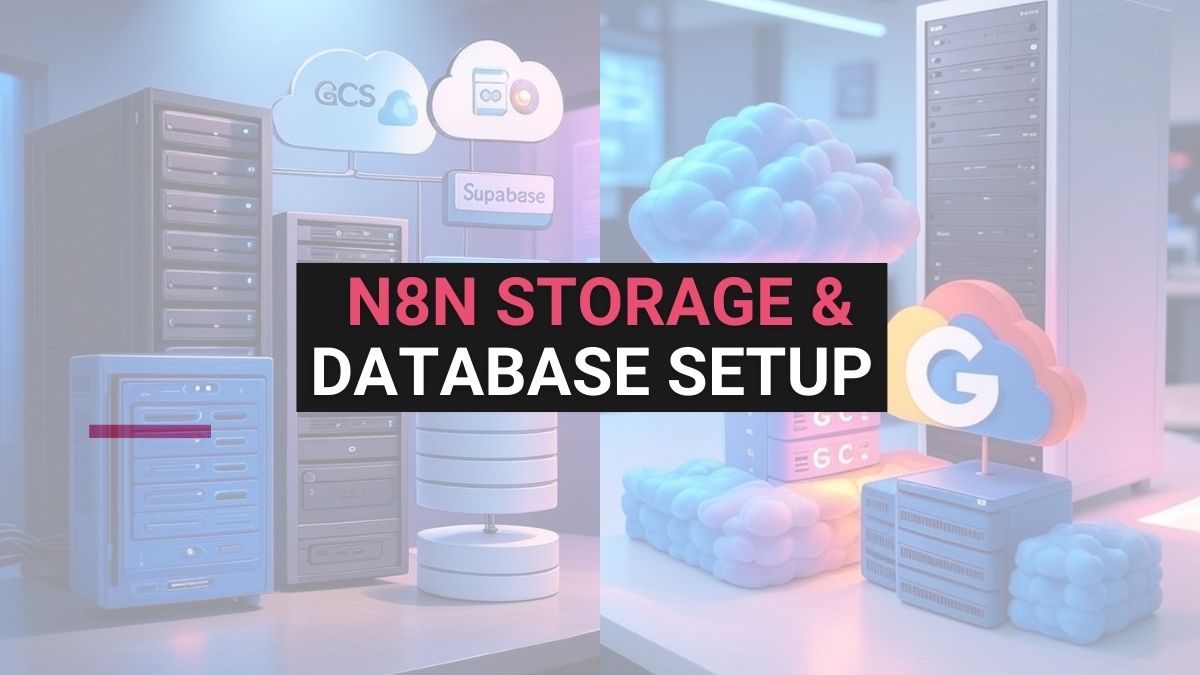
n8n stores credentials and workflow data in SQLite by default, which suits local testing but not production. This guide shows how to connect n8n to Redis for fast key-value and cache storage, Google Cloud Storage for files and Supabase (Postgres) for application data, with step-by-step screenshots, importable test workflows and troubleshooting tips.
When you build reliable automations with n8n, you often need a place to store data, not only credentials and workflow metadata but also files, cached items, and lookup records. This guide shows practical, secure steps to connect n8n to Redis (fast key-value/cache), Google Cloud Storage (GCS) for object files, and Supabase for app-friendly storage and Postgres data. You’ll get step-by-step setup, importable test flows, and simple troubleshooting tips.
Quick note: n8n uses SQLite by default for local setups but supports external databases and external binary storage via environment variables. Use external storage for production workloads.
Pro Tip: Start working on n8n with Quick Alternative with Free Credits: If you don’t want to manage hosting yourself, you can also use:
| Use case | Best for | Cost/notes |
|---|---|---|
| Redis | Cache, ephemeral queues, session store | Low-latency; not for large files. Use managed Redis for persistence. |
| Google Cloud Storage | Large files, backups, media | Object storage with lifecycle rules & versioning. |
| Supabase Storage | App files, CDN, small/medium assets | Easy auth + Postgres integration; good for web apps. |
Environment variables are the safest way to provide credentials to n8n. n8n also supports file-based overrides (append _FILE to variable names), which is perfect for Docker or Kubernetes secrets. Pro tip: If you need a walkthrough on n8n credentials, see our n8n credentials & setup guide
# Database
DB_TYPE=postgresdb
DB_POSTGRESDB_HOST=postgres.example.com
DB_POSTGRESDB_PORT=5432
DB_POSTGRESDB_DATABASE=n8n
DB_POSTGRESDB_USER=n8n
DB_POSTGRESDB_PASSWORD_FILE=/run/secrets/db_password
# External storage (example)
N8N_EXTERNAL_BINARY_DATA_STORAGE=gcs
N8N_EXTERNAL_GCS_BUCKET=my-n8n-bucket
GOOGLE_APPLICATION_CREDENTIALS=/run/secrets/gcs_service_account.json
# Redis (if using as cache)
REDIS_HOST=redis.example.com
REDIS_PORT=6379
REDIS_PASSWORD_FILE=/run/secrets/redis_password
Best practice: Keep secrets out of Git. Use Docker secrets, cloud secret managers (AWS Secrets Manager, Google Secret Manager), or Kubernetes Secrets with the _FILE pattern. n8n docs
Use Redis when you need very fast reads/writes, ephemeral queues, rate limiting, or session data. Not for large files. Managed Redis providers offer free tiers and simple dashboards.
1. Go to https://redis.io/ and Click "Try Redis"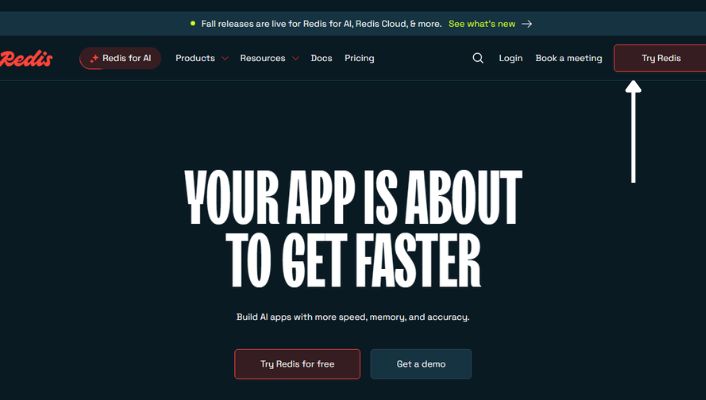
2. Create an account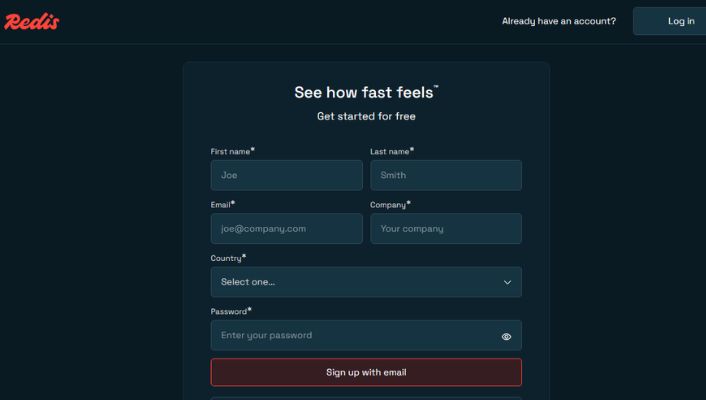
3. Log in and click "New database"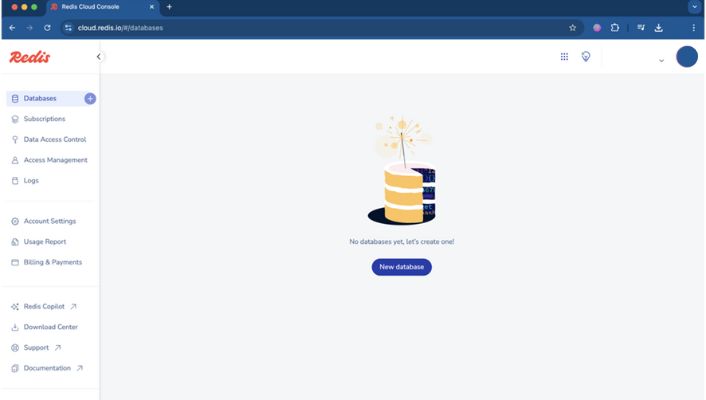
4. Select "Essentials".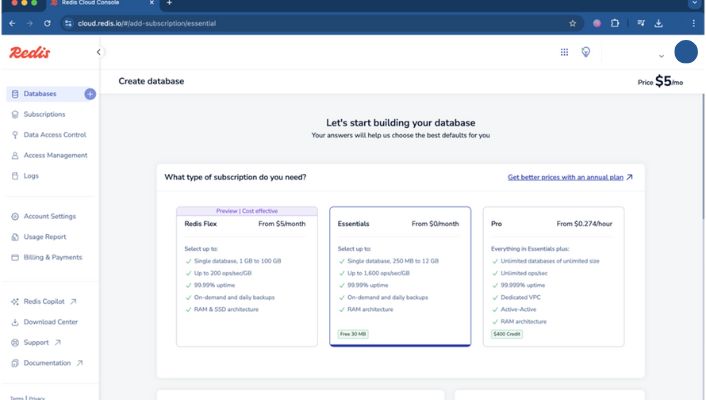
5. Enter a Database name, choose any cloud vendor, and pick the nearest Region.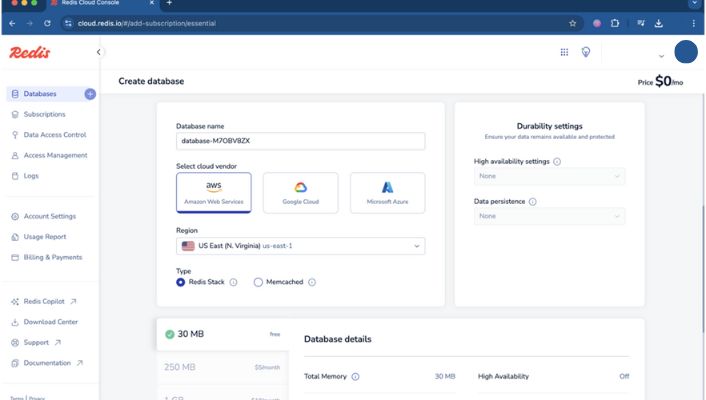
6. Choose the "30 MB Free Plan" and click "Create database".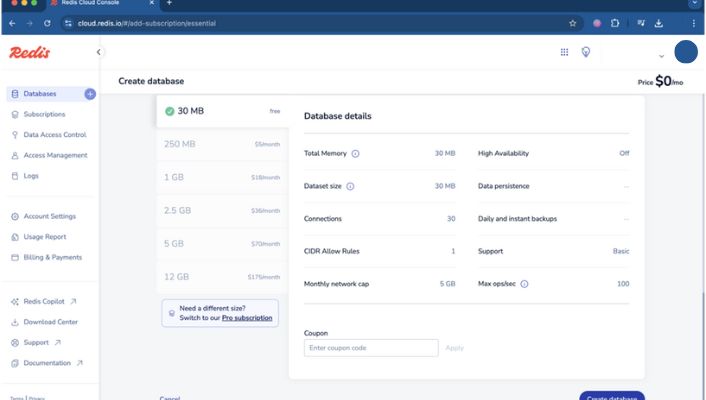
7. Click "Connect to database" → "Connect".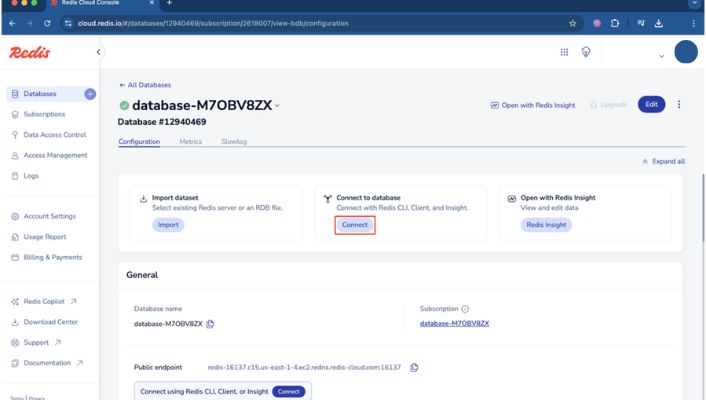
8. Open "Redis CLI" and click the eye icon (or "View") to reveal connection details.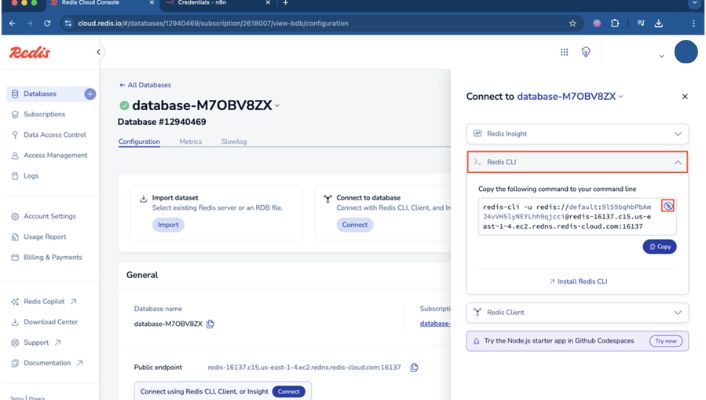
9. In your n8n editor go to "Credentials" → "Add credential".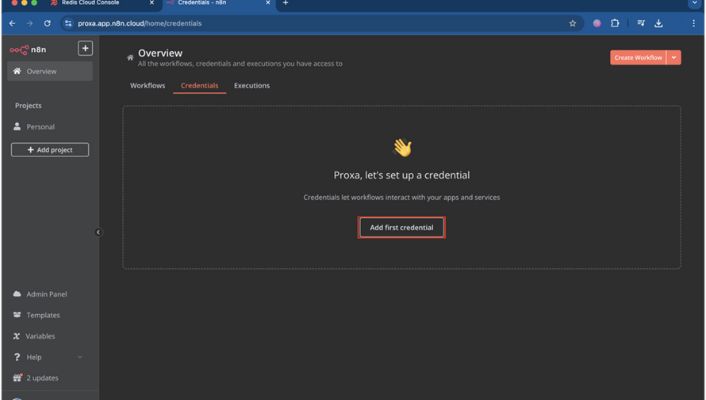
10. In "Search for app" type "Redis" and click "Continue".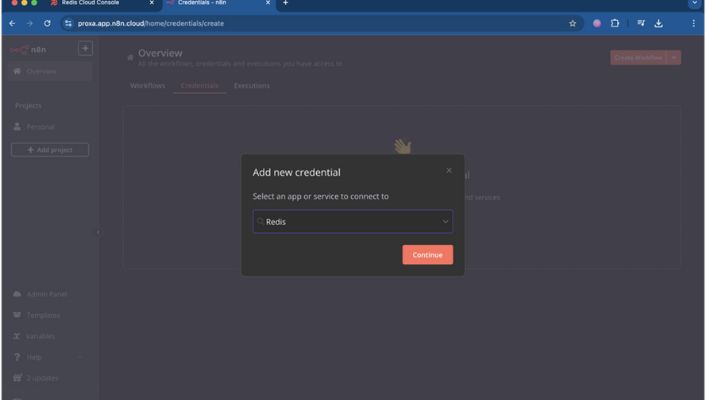
11. Map the fields Password, User, Host, and Port, then click "Save".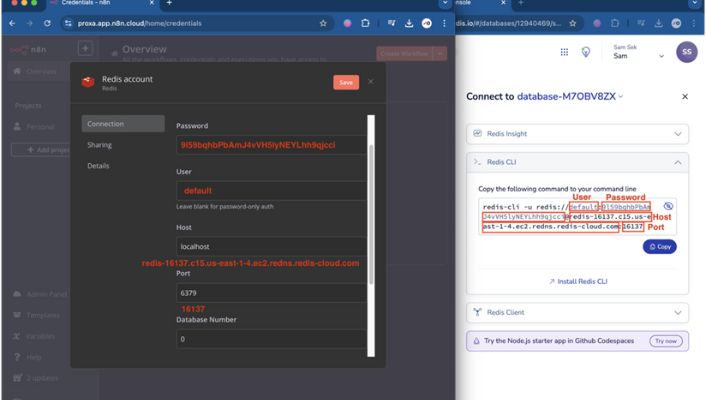
Import this JSON into n8n (Editor → Import), then edit credentials to match your Redis instance.
{
"name": "Redis SetGet Example",
"nodes": [
{
"name": "Manual Trigger",
"type": "n8n-nodes-base.manualTrigger",
"typeVersion": 1,
"position": [250, 200]
},
{
"name": "Redis SET",
"type": "n8n-nodes-base.redis",
"typeVersion": 1,
"position": [500, 200],
"parameters": {
"operation": "set",
"key": "n8n_test_key",
"value": "Hello from n8n",
"ttl": 3600
},
"credentials": {
"redis": {
"id": "your-redis-credential-id",
"name": "Redis"
}
}
},
{
"name": "Redis GET",
"type": "n8n-nodes-base.redis",
"typeVersion": 1,
"position": [750, 200],
"parameters": {
"operation": "get",
"key": "n8n_test_key"
},
"credentials": {
"redis": {
"id": "your-redis-credential-id",
"name": "Redis"
}
}
}
],
"connections": {
"Manual Trigger": { "main": [[ { "node": "Redis SET", "type": "main", "index": 0 } ]] },
"Redis SET": { "main": [[ { "node": "Redis GET", "type": "main", "index": 0 } ]] }
}
}
Choose GCS for large assets: Images, backups, logs, and binary objects. GCS supports lifecycle rules, versioning, and regional buckets. GSC Docs
Store the service account JSON in a secure path inside the container or use the _FILE pattern with Docker secrets: GOOGLE_APPLICATION_CREDENTIALS=/run/secrets/gcs_service_account.json
N8N_EXTERNAL_BINARY_DATA_STORAGE=gcs
N8N_EXTERNAL_GCS_BUCKET=my-n8n-bucket
GOOGLE_APPLICATION_CREDENTIALS=/run/secrets/gcs_service_account.json
Import and set your credentials.
{
"name": "GCS Upload Example",
"nodes": [
{ "name": "Manual Trigger", "type": "n8n-nodes-base.manualTrigger", "typeVersion": 1, "position":[250,200] },
{
"name": "Set Binary Data",
"type": "n8n-nodes-base.set",
"typeVersion": 1,
"position":[450,200],
"parameters": {
"values": {
"binary": [
{ "key": "data", "value": "={{Buffer.from('My sample file content').toString('base64')}}" }
]
},
"options": {}
}
},
{
"name": "Google Cloud Storage",
"type": "n8n-nodes-base.googleCloudStorage",
"typeVersion": 1,
"position":[700,200],
"parameters": {
"operation": "upload",
"bucket": "my-n8n-bucket",
"binaryPropertyName": "data",
"fileName": "sample.txt"
},
"credentials": {
"googleCloud": {
"id": "gcs-credential-id",
"name": "GCS Service Account"
}
}
}
],
"connections": {
"Manual Trigger": { "main":[[{"node":"Set Binary Data","type":"main","index":0}]] },
"Set Binary Data": { "main":[[{"node":"Google Cloud Storage","type":"main","index":0}]] }
}
}
Use Supabase when you need both file storage (CDN-enabled) and database metadata (Postgres) with simple auth. Good for web apps and prototypes.
You now have a clear path for adding storage to n8n: pick Redis for fast ephemeral data, GCS for large files, and Supabase for app-centric storage + Postgres. Import the example flows, add credentials, and test. After that, set up secrets management, add retry/error handling, and enable backups for production.
Q1: Do I need a paid plan to use Redis/GCS/Supabase with n8n?
No, all three providers offer free tiers suitable for testing. Free tiers have limits (storage size, request quotas). For production use choose a paid tier that fits your reliability needs and set up backups and monitoring.
Q2: Where should I store service account JSON files?
Store them outside your codebase, ideally in Docker secrets, Kubernetes secrets, or cloud secret managers. Use the _FILE pattern with n8n so the secret is mounted into the container and referenced as a file path in env vars.
Q3: Can n8n use Redis as the primary database?
No, Redis is great for caches, queues, and ephemeral data, but n8n requires a proper database like Postgres for workflow metadata in production. Use Redis alongside a supported DB for best results.
Q4: How do I test file uploads to GCS from n8n?
Import the GCS Upload Example JSON, set your GCS credentials, run the Manual Trigger, then check the bucket in Google Cloud Console for the uploaded file. If you get permission errors, verify the service account role and bucket name.
Q5: What retry strategy should I add for storage writes?
Add node-level retries for intermittent errors, use idempotency keys to avoid duplicates, and create an error workflow that sends alerts (email/Slack) on repeated failures. For large file uploads, retry in chunks or use resumable upload APIs where supported.
Q6: Can n8n store files in Google Cloud Storage?
Yes, use the Google Cloud Storage node and authenticate with a service account JSON. Set N8N_EXTERNAL_BINARY_DATA_STORAGE=gcs if you want n8n to store binary data externally.
Q7: Is Redis persistent for n8n data?
Redis can be persistent if you enable snapshotting/AOF or use a managed provider with backups. For durable long-term storage, prefer GCS for files and Postgres for metadata.
Q8: Does Supabase work with n8n?
Yes, n8n has a Supabase node to upload files and work with Postgres in the same project.
Q9: How to keep service account keys secure?
Use Docker/Kubernetes secrets or a cloud secret manager, and the _FILE env var pattern to avoid plaintext in env vars.
Q10: Should I use external storage for a small hobby project?
For simple hobby projects, local storage is fine, but external storage increases reliability and is better for containers/cloud hosting.
No, all three providers offer free tiers suitable for testing. Free tiers have limits (storage size, request quotas). For production use choose a paid tier that fits your reliability needs and set up backups and monitoring.
Store them outside your codebase, ideally in Docker secrets, Kubernetes secrets, or cloud secret managers. Use the _FILE pattern with n8n so the secret is mounted into the container and referenced as a file path in env vars.
No, Redis is great for caches, queues, and ephemeral data, but n8n requires a proper database like Postgres for workflow metadata in production. Use Redis alongside a supported DB for best results.
Import the GCS Upload Example JSON, set your GCS credentials, run the Manual Trigger, then check the bucket in Google Cloud Console for the uploaded file. If you get permission errors, verify the service account role and bucket name.
Add node-level retries for intermittent errors, use idempotency keys to avoid duplicates, and create an error workflow that sends alerts (email/Slack) on repeated failures. For large file uploads, retry in chunks or use resumable upload APIs where supported.
Yes, use the Google Cloud Storage node and authenticate with a service account JSON. Set N8N_EXTERNAL_BINARY_DATA_STORAGE=gcs if you want n8n to store binary data externally.
Redis can be persistent if you enable snapshotting/AOF or use a managed provider with backups. For durable long-term storage, prefer GCS for files and Postgres for metadata.
Yes, n8n has a Supabase node to upload files and work with Postgres in the same project.
Use Docker/Kubernetes secrets or a cloud secret manager, and the _FILE env var pattern to avoid plaintext in env vars.
For simple hobby projects, local storage is fine, but external storage increases reliability and is better for containers/cloud hosting.
 Tutorials and How-To Guides
Learn how to connect Google Cloud Storage to n8n workflows. Complete setup guide with OAuth2 configuration, bucket creation, and automation examples.
 Tutorials and How-To Guides
Learn how to configure n8n credentials, set up your environment, and run your first workflow. Step-by-step guide for beginners.
 Tutorials and How-To Guides
Complete Moltbot tutorial: Learn what this viral AI assistant does, critical security risks, safe setup steps & why VPS hosting is essential for privacy.